
Showing posts with label Tech PD. Show all posts
Thursday, May 2, 2019
TCEA Teacher Appreciation

From May 6-10, 2019, you can get a one-year membership to TCEA absolutely free!
TCEA (Texas Computer Education Association) is offering all current and retired educators, administrators, and librarians free, one-year TCEA memberships, regularly priced at $49! This offer includes all exclusive webinars, training, and up to 80+ free CPE hours annually.
You can learn all about it on the official TCEA page. https://tcea.org/teacher-appreciation/
What is TCEA and why should you join?
TCEA is a Texas-based, global nonprofit, member-based organization that supports the use of technology in education, provides top-notch professional development, and hosts world-class events, including the TCEA Convention & Exposition. Since 1980, TCEA has worked to develop digital learning knowledge and access in PreK-16 education.
As a grassroots organization, TCEA advocates for the smart use of technology in education based on the interests of its thousands of members: teachers, administrators, librarians, CTOs and technologists, and ed tech aficionados. As a member, you can get 24/7 access to webinars and gain CPE credit, join an online community sharing best practices, and become a leader on your campus or in your district.
What is TCEA and why should you join?
TCEA is a Texas-based, global nonprofit, member-based organization that supports the use of technology in education, provides top-notch professional development, and hosts world-class events, including the TCEA Convention & Exposition. Since 1980, TCEA has worked to develop digital learning knowledge and access in PreK-16 education.
As a grassroots organization, TCEA advocates for the smart use of technology in education based on the interests of its thousands of members: teachers, administrators, librarians, CTOs and technologists, and ed tech aficionados. As a member, you can get 24/7 access to webinars and gain CPE credit, join an online community sharing best practices, and become a leader on your campus or in your district.
Tuesday, April 30, 2019
Badges and Certifications
We hope that this summer you take time to unwind, recharge, and pursue things that interest you! Below is a list of free EdTech Badges and Certifications to help you learn, grow, and connect with communities that have similar interests.
Through these communities, you will have the opportunity to grow your personal learning network. The importance of PLN's cannot be overstated. Personalize your learning, build relationships with like-minded educators, and collaborate on your own time and pace. For more info on starting your PLN, click here. Together we are better!

Sunday, April 7, 2019
iCamp 2019: Google Expeditions

What is Google Expeditions? Google Expeditions is a virtual-reality
teaching tool. You can swim with sharks, visit outer space, explore the human
body, walk through a museum, visit landmarks, battlefields and more without
leaving the classroom. You can guide students on an adventure, or have them
self-explore. Check on the video below!
Google has mode some improvements this year to Expeditions, including better connectivity in the classroom. This year we will also discuss Google Expeditions Augmented Reality where you can place items in your room "virtually" for students to interact with.
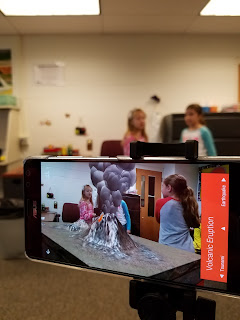
AR/VR Field Trips with Google Expeditions
Come join us! Session dates below!
Tuesday, April 2, 2019
Become a Microsoft Innovative Educator

If you are an MIE, please take a moment to complete this form.
Face-to-Face Opportunities
Microsoft Teacher Academy (All Day Training) - Wednesday, 6/5/19, 8:30 - 3:30
Microsoft Teacher Academy (All Day Training) - Wednesday, 7/10/19, 8:30 - 3:30
Online Opportunities
The Online Microsoft Summer Academy 2019 is an online Canvas course that contains 10 unique modules, geared toward a specific topic or skill. The Academy will open on June 3 and run through August 5, 2019. Complete one or all of the modules!
By participating in the Online Academy you will...
- receive 2 hours of professional development credit for each module (up to 20 hours total)
- have the flexibility to learn anytime, anywhere
- earn points towards your MIE certification
- participate in discussions and share ideas with educators across KISD
- receive digital and paper badges to display proudly
- best of all, have knowledge of more tools available for you and your students that not only engage, but also save time, make things more accessible, and prepare students with the technology skills they need to be successful!
Click on the name of each module to register in Eduphoria:
Introduction to Skype in the Classroom
TweetMeet: Join the Chatter
Digital Storytelling with Microsoft Sway
Create Digital Notebooks - Getting Started with OneNote
Empower Every Student with an Inclusive Classroom
Training Teachers to Author Accessible Content
Microsoft Forms: Creating Authentic Assessments
Streamline Efficiency with O365 Apps
Developing Workforce Ready Skills in Office Online
Empower Students to Do More with O365
More details about each online course are in the Sway below.
*The above presentation was created in Sway, an O365 app that is available for teachers and students! Bonus - Sways easily embed into Canvas and can also be shared with a link, making it easy for students to turn in as an assignment.
We hope to see you in person or online this summer!
Continue Learning/Additional Resources
Microsoft Education
What's New in Office 365
Stay up-to-date on new features in Office.
Education Help Center
Find answers to your questions on Office 365 apps.
Office 365 Learning Center
Visit this end user hub to access hundreds of step-by-step instructions on how to perform tasks in Office applications including Word, Excel, PowerPoint, OneNote, Outlook, and OneDrive. An overview video about Office 365 with links to additional information about individual products and services is here.
Office Help and Training
Find out how to get the most out of Office 365 on all your devices, and take Office 365 scenario-based tutorials to see how to transform the way you work. Topics include content collaboration, email and calendar on the go, and bring your team together.
Accessibility Features in O365
Learn about capabilities that make working with files more easily accessible to users with vision, dexterity, and other disabilities. This means you can use keyboard shortcuts, a screen reader, or a speech recognition tool to work with Office 365.
Templates for Education
Download theses handy Office templates including a syllabus, lesson plan, checklist, and PowerPoint designs.
@MicrosoftEDU
@OneNoteEDU
Thursday, March 28, 2019
iCamp 2019

WHEN is iCamp?
Monday -Thursday, 8:30 – 3:30 during the following weeks:
June 3 – June 20 (3 weeks)
July 8 – July 18 (2 weeks)
Numerous virtual opportunities are being offered as well that will run all summer long such as:
OPERATION Tech Bingo
Online Microsoft Summer Academy 2019
WHERE is iCamp?All face to face sessions will be held at Beck JH.
WHAT is iCamp?
iCamp is five weeks of instructional technology professional development opportunities that includes over 50 unique hands-on sessions covering everything from hardware to software. Attend one or all of the sessions!
When can you REGISTER?
Registration is now officially open! All courses are listed in Eduphoria/Strive so you can start making your plans now!
We put together a Google Calendar that lists each session and includes direct registration links to Eduphoria.
https://sites.google.com/katyisd.org/kisdsecctd/icamp/schedule-at-a-glance

In addition, underneath the calendar there is a session summary document with the dates listed for all sessions.


What can you LEARN?
At iCamp we don't want to just introduce you to a bunch of resources, we want to help you understand the best way to use and implement them. Not only do we focus on things like Canvas, Google, Chromebooks, O365, and iPads but you'll also get plenty of soft skill instruction on using these tools for classroom management, fostering growth mindset, backward design for lesson planning and more! Our lessons are always anchored in a solid pedagogical foundation and we have numerous instructors from all over the district that fill many roles, so we have something for everyone!
We’ve added back the Microsoft Academy (face to face and online) this year and we have two new workshop experiences – Minecraft for Education and Gamification! We are also highlighting SMART Suite Online this summer.
Head on over the Secondary CTD website to learn more and see a list of sessions being offered.
Sunday, February 24, 2019
What's that you Sway? Digital Storytelling with Microsoft Sway

Sway is a design and publishing tool that allows students to share professionally designed work, while focusing on the content, not the design. Sway has a built-in design engine and adaptive layout that enables students to add content, and Sway will make sure it looks good.
Learn more by completing the Digital Storytelling with Microsoft Sway course on the Microsoft Educator Community.
Objectives of the Course:
- Learn how Sway works to share text, images, video, and dynamic content to tell a rich story
- See examples of Sway's impact in the classroom
- Practice creating a Sway
- Understand how Sway can be used in a variety of ways

How are you using Sway? Tweet out your learning - @Sway and @kisdsectech
Sunday, February 10, 2019
TCEA 2019 Resources

TCEA 2019 Special Edition Newsletter
This past week the JH Classroom Technology Designers attended the Texas Computer Education Association (TCEA) Convention. We're excited to share with you some of the new things that we learned!For a full session list (which includes links to handouts and presentations) click here.


Click here to learn how to use this feature.
Ready to learn more?
Click here to learn about all of the Learning Tools in Word Online.
Check out these courses on the Microsoft Educator Community (sign-in with your O365 account).
- Accessibility tools: Meeting the needs of diverse learners
- Empower every student with an inclusive classroom


Click here for the Green Screen presentation from TCEA.

 Want to make learning or reviewing content fun and engaging? Use OneNote to create a digital escape room. Students will read content, watch videos, or look at images to solve the clues. Sections are locked with a passcode, but the correct answer will "unlock" the next section.
Click Here for an Example: The last section will give you the passwords to all sections - the password to this section is OneNoteAvenger.


Digital Icebreakers That Shatter: Activities to Break the Ice
Contains nine unique activities including all of the instructions, templates, and resources you need to replicate them.

Get online resources for your classroom all in one place!

Ready, Set, Make!
Meaningful makerspace ideas even if you don't have a lot of resources, storage space, or access to tech.
Meaningful makerspace ideas even if you don't have a lot of resources, storage space, or access to tech.
Please don't hesitate to let your CTD know if there is a topic that you're interested in learning more about!
Wednesday, January 30, 2019
TCEA 2019

The Junior High Campus Technology Designer Team will be attending sessions as well as presenting at the TCEA 2019 Convention & Exposition in San Antonio, February 4 - 7.
This will be TCEA's (Texas Computer Education Association) 39th annual convention, where they will showcase 1,000+ informative sessions and hands-on workshops. In addition there will be hundreds of exhibitors displaying the latest ed tech resources.
If you are on Twitter, we encourage you to attend the conference virtually with us by following the Twitter hashtags #tcea and #KISDSecTech.
Be sure to follow us, too! We will be sharing information from the sessions that we are attending.
 Jay Sonnenburg - JH Team Manager
@JaySonnenburg
David Crockett - BJH, KJH, MCJH, MMJH, TJH,
@DavidCrockettTX
Noreen Dooley - BDJH, CRJH, MDJH, WCJH, WMJH
@nodooley
Kristie Follett - CJH, MPJH, MRJH, SJH, SLJH
@techchickkf
In addition, you will be able to access session handouts here - TCEA 2019 Session Handouts
We are looking forward to sharing even more of what we learn when we get back!
 Jay Sonnenburg - JH Team Manager
@JaySonnenburg
David Crockett - BJH, KJH, MCJH, MMJH, TJH,
@DavidCrockettTX
Noreen Dooley - BDJH, CRJH, MDJH, WCJH, WMJH
@nodooley
Kristie Follett - CJH, MPJH, MRJH, SJH, SLJH
@techchickkf
In addition, you will be able to access session handouts here - TCEA 2019 Session Handouts
We are looking forward to sharing even more of what we learn when we get back!
Friday, January 18, 2019
Operation Tech Bingo

KISD Secondary
teachers are invited to join Operation: Tech Bingo 2.0. A Canvas course designed to provide
professional development on implementing technology in your classroom, anytime,
anywhere!
Join the course at anytime or
if you are already enrolled, log into Canvas and pick up where you left off.
Click here to enroll in the Canvas course to get started.
Subscribe to:
Posts
(
Atom
)